It started as a todo list
I’ve long struggled with the problem that my to-do items come from various places, often subtly; Slack, Teams, emails, calls etc.
Historically I’ve been able to make this somebody-else’s-problem - “if you want it, raise a ticket”, but now what I need apparently is discipline.
Fortunately, AI agents were invented, and while I don’t have discipline I do have a cron daemon so surely I can get my agents to read my messages on routine and distil them into one place?
Now, each morning a robot scans my mailboxes and chat apps for things I’ve said I’ll do and makes sure they’re all on the todo list.
All I have to do now is go to one place to see things, do things, and tick things off. I’ve put the generic parts up as agentic-rituals.
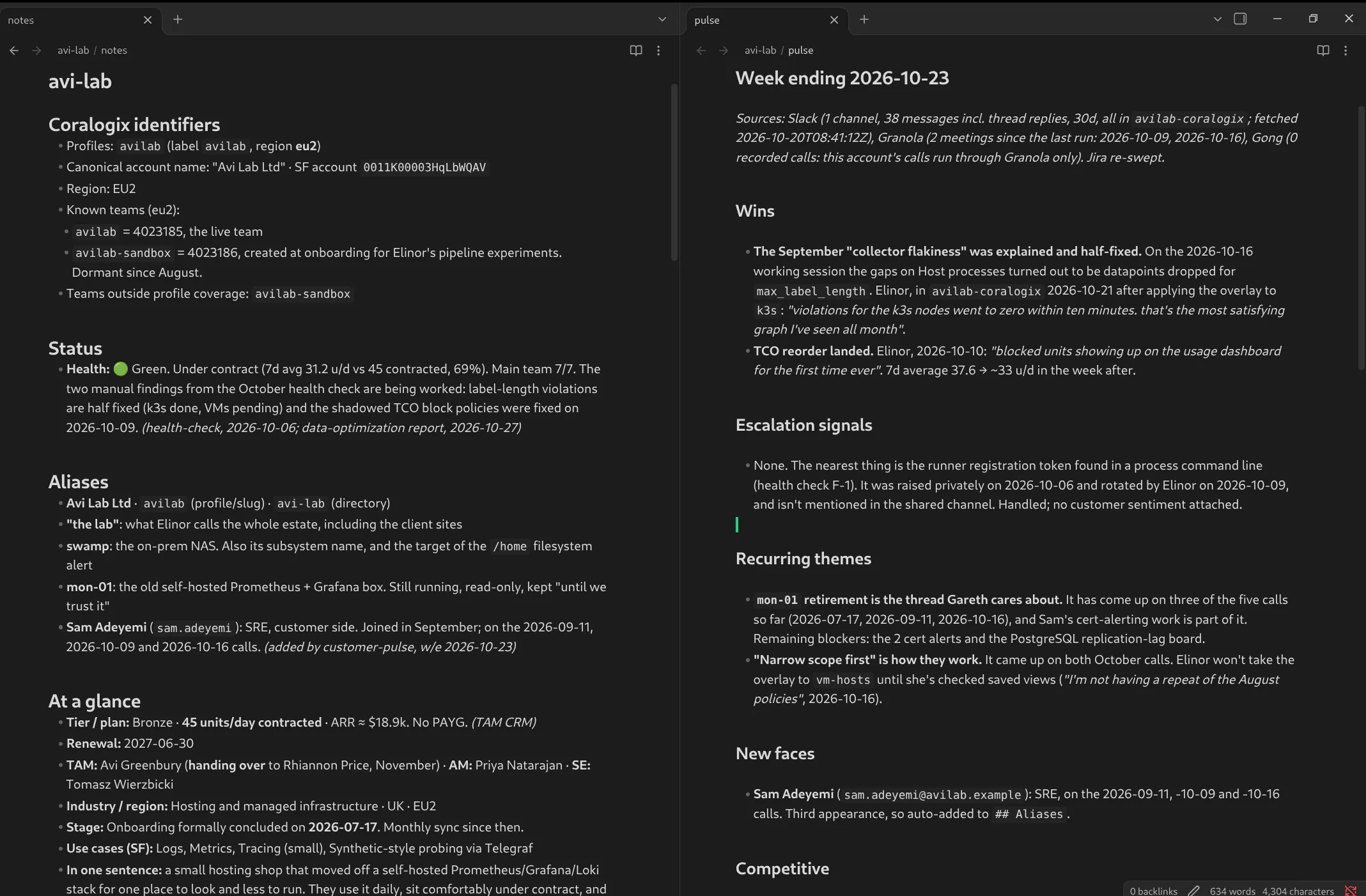
The interesting thing here, I think, is that I started out trying to manage my todo list, and ended up with a knowledgebase that I can ask generic questions of across my customers. There’s an example of a dummy ‘avi-lab’ customer here if you fancy seeing where I ended up without reading anything further: https://avi.st/stuff/agentic-customers/avi-lab/
The ritual
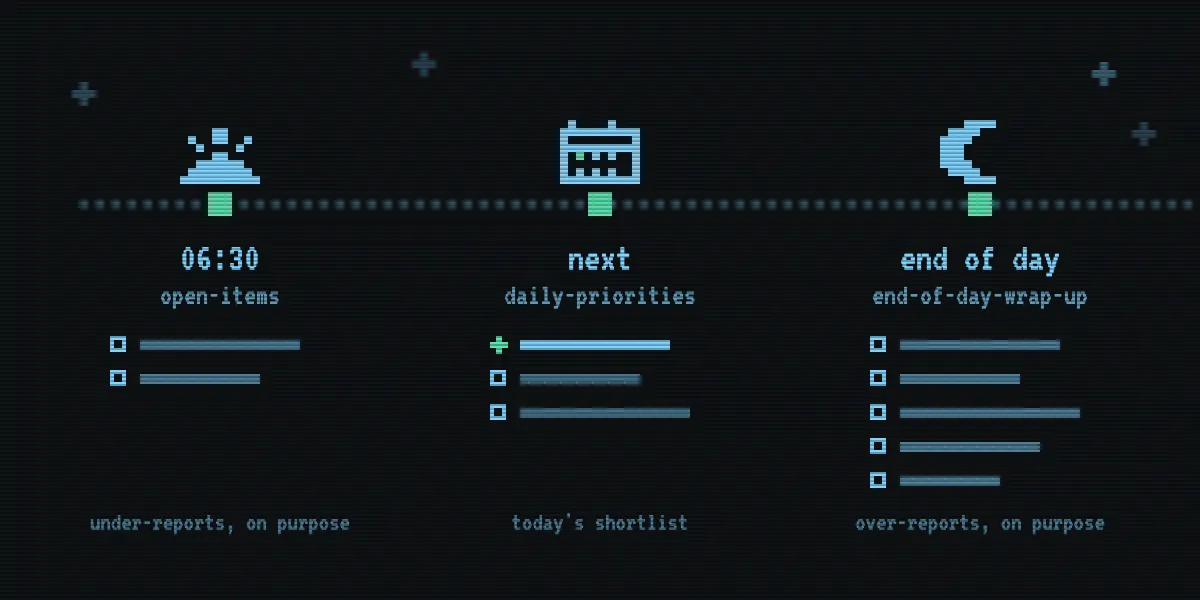
This began with three obvious processes to run, each at particular points in the day, and these three became the first three skills:
- At 06:30, before I’m up,
open-itemsreads the last couple of weeks of chats, messages and calls and picks out anything that’s an open item and writes it to a Markdown file in my notes That’s either someone waiting on me, my having said I’d do something, or my having asked something nobody’s answered. - When I sit down at my desk in the morning I run
daily-prioritieswhich reads that file and my next few days of calendar and tells me what matters - I’m not going to do everything in the list today, but I should do the things that are for the people I’m talking to today or that have impending deadlines. - Before I go home I run
end-of-day-wrap-upwhich looks at what I said I’d do today and checks whether I’ve done it.
The morning run errs on under-reporting and the evening one on over-reporting; if each morning begins with a todo list that’s mostly things I can skip I’ll likely get in the habit of ignoring the whole list, but in the evening it’s more important to capture the entirety of the smaller set of things I said I’d do “today”.
The working file format of these is Markdown with checkboxes:
- [ ] Send Jane the collector config she asked for
  - **owed-by-me** · Jane Doe · 2d · #acme-onboarding — "can you send the config?"
I settled on this format while using vscode to manage them, but then found that Obsidian is basically built for this, especially with its Tasks plugin.
Sadly, I still have more things-to-do than time-to-do-them-in, and this is only exacerbated by having something that near-flawlessly keeps track of everything!
It’s grown out of being just a todo list
To tag each to-do item with the right customer, the agent needs to know which Slack channel, email domain or meeting title belongs to which customer, so each customer gets a directory in my notes, with a file of aliases in it.
Then, since the agent was reading all those threads and calls anyway, it started writing down what it learnt; I don’t just have my todos, I have their context.
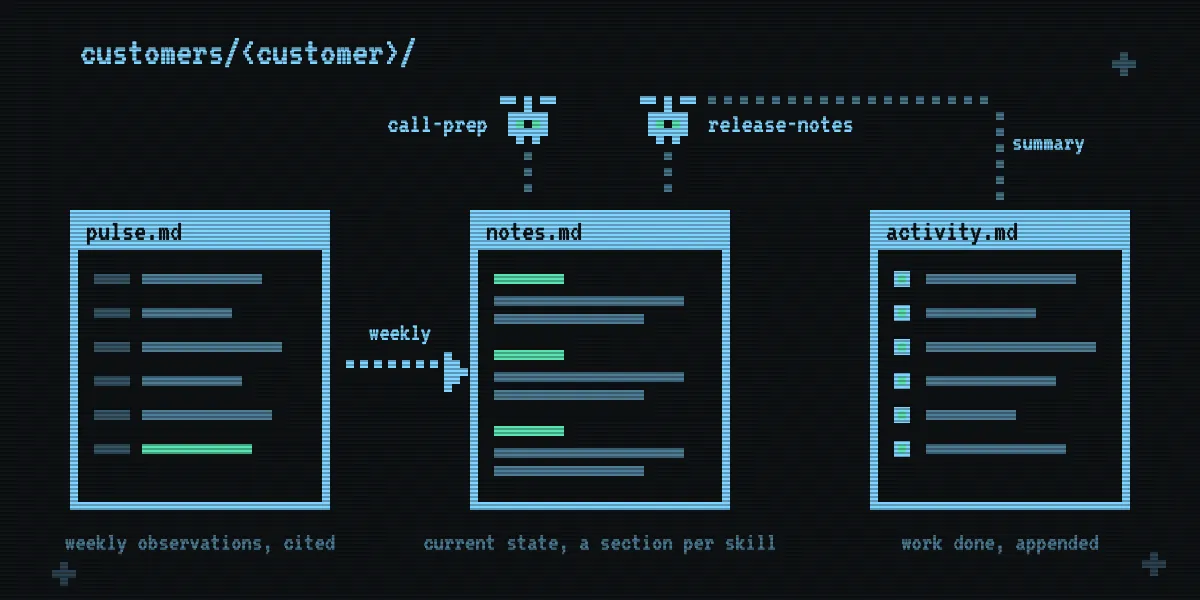
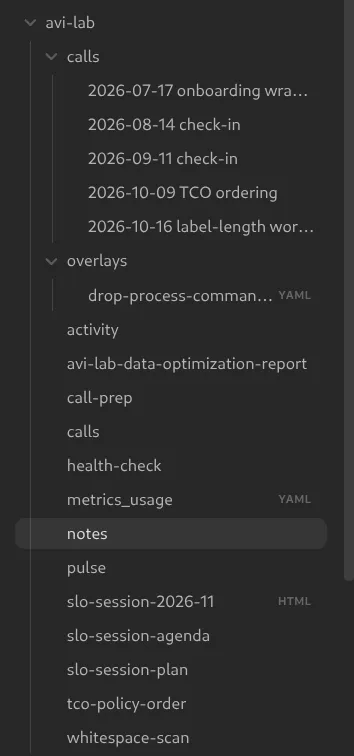
Each customer’s directory now has:
notes.md: a statement of what’s currently true. Contacts, projects and their status, the customer’s priorities and environment, decisions we’ve made, how they like to work.pulse.md: a weekly log of what was observed and where, with citations. It’s only ever appended-to.activity.md: a log of what I’ve done for them; any skill that I use to do a thing for a customer writes details of its invocation here.
And I have another skill that runs weekly to turn the evidence in pulse.md into the current-state in notes.md.
The first massive payoff here for me was when I went away for three weeks and left my laptop behind (have you felt the heft of a 16” macbook pro?); coming back I just had to wait for the agents to run over a slightly longer than usual window, and then say “what do I need to know?” to get a more-complete handover than you can really expect of a human.
But wait, there’s more
The shift from per-customer todo lists into my knowledgebase began with giving each skill its own section of notes.md; each skill can read all the others’ sections, so when I think of something new I just write the skill and it adds a section of its own.
This is where it started becoming a datastore; once I’ve got the headline notes of where we’re at and the history of what happened, more than just “what do I need to do today” I can ask questions like “what have we delivered in the last six months”, “what do they ask in their support tickets” and the like.
And then as I add more skills to check the health of the customer’s environment, to estimate the effects of changes to their configs, to assess which features of the product they’re not using, and the like, these can write detailed output to a dedicated file in the customer’s directory, with a summary to the activity log.
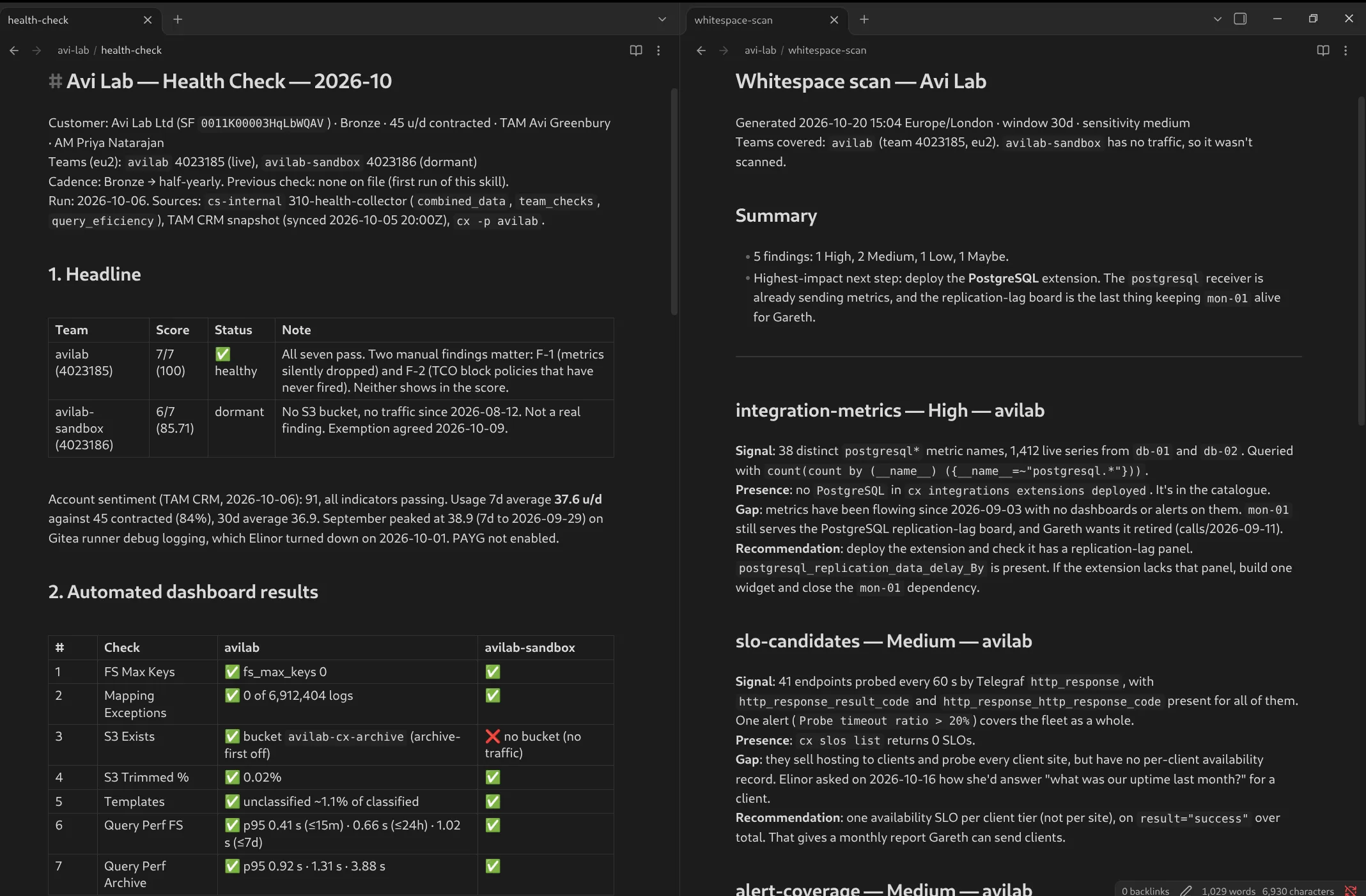
The to-do list is still the part I look at every morning, but all day now I’m working in and off this collection of data and metadata about the product and its users, and the starting point for a brand-new skill about a thing I hadn’t thought of yesterday is often just a “Claude, write me a skill to…”
The questions I ask most often became a few other ad-hoc skills that I mostly got Claude to write:
call-prepreads that customer’s notes, open items and recent threads, and tells me what’s likely to come up in the call and what I need to make sure comes up - work that’s in-flight, things that have happened since we last spoke, new features on the horizon etc.release-notesgoes through every customer’s environment and projects when we release a new feature and suggests who might like it, whether because they asked specifically for it or sound like they’d benefit.
There’s a couple of telemetry-specific ones, since a big chunk of my job is improving observability setups - I have skills for finding unused data (one grew into the unused metrics finder), calculating the balance of enabling spanmetrics (more metrics, fewer spans), looking for malformed and unindexed data.
I also have some generic day-to-day skills - prompts for discovery calls, tools to generate onboarding plans from call transcripts, then to judge progress against that plan, and to measure the difference between predicted and actual sizing.
When I’m planning enablement sessions, I’ve skills to look up which features the customer uses, which features they open tickets about, and then generate a slide deck that refers to their actual usage, or a demo session solving their own actual problems. Spending the session fixing up a customer’s alerts and dashboards is a lot more engaging than yet another “imagine you’re running a webshop and the payment processor isn’t responding”!
This I think is my big takeaway from this system - not just the idea of using skills to automate processes, but the fact that using agents rather than traditional queryable databases means you can just keep throwing useful data at the store and later on make sense of it; if something seems useful you might as well store it.
What I learnt making it
The biggest thing here was that it’s actually quite productive to get the agent to write its own tooling - most of my skills began with my asking Claude to write one, and a lot of the finessing came from asking Claude what I’ve had to correct it on; none of these began with a text editor with an empty file in it!
I’ve also found this cycle of writing skills to be hugely faster, more productive, and more-capable than the relatively inert one I’m used to where I write my own scripts (and then have to maintain another todo list of things I want to fix in them). There’s so much value in being able to send Claude off to just figure out how to make this easier, while I get on with actual-work in another window.
I settled on a pattern of declaring rules to the agent, both for writing skills and running them. Some of these are harder-won than others:
Scripts collect, the model judges: LLMs are famously non-deterministic, and “check slack for my messages” means different things to different models, even to the same model on different days. So scripts fetch everything, and the model decides what they mean. This one actually came about out of a fear of over-use of tokens (why burn tokens on a thing a shell script can do?) but more than being an expensive way to retrieve messages, it turns out agents are also not very good at it and I think this difference in behaviour is more noticeable than the cost.
Keep a list of forbidden shortcuts: Every time Claude found a clever, wrong way round a step, I added it to a list at the top of that skill. “File is recent, skipping the fetch” is a biggie, so is “restoring the file from git history” rather than rewriting it.
Make it prove it did the work: The most-hidden shortcut I’ve hit is the agent finding that it already has the data (from the last run) and opting to not go to the effort of retrieving up-to-date data. It’s not enough to simply forbid this, it turns out, so every fetch script prints a timestamp and the agent has to repeat it to me. These shortcuts are the subtlest problems I’ve had, and it’s really worth being actively on the lookout for them whenever you’re getting an agent to fetch stuff.
Give everything an ID: Each item has a slack:<channel>:<timestamp> style reference (stored as a comment in the markdown), so each run knows it’s the same item and keeps it ticked.
LLMs are good at understanding and judging, but they are not very good at noticing that this new todo item is actually that one it found last week.
Use hooks to manage permissions for automated runs: A cronned run at 6am can’t prompt for permission (and I wouldn’t want a cronned one at 10am to either). A blanket permission would mean it can quietly overwrite something I wrote by hand, but a hook lets me create reasonably specific rules on which files may or may not be edited by a skill, reducing friction when it’s doing the right thing but still somewhat guarding against doing the wrong thing; mine simply allow new files but forbid overwrites which suits how I run the non-interactive skills.
Email is still a thing: There’s a lot of services we use where I can’t get MCP or API access, but for a lot of them I can get my activity out in the form of email, and my agents can search and read my mailbox. This is how I get my Gong transcripts and PR comments into the system, for example. PR comments become todo items, and Gong transcripts are scanned for action items and then written to local files to make it easier for an agent to later go over all of them when I wonder what I’ve talked to customers about.
What’s in the repo
The repo contains a stripped-down and anonymised version of all this, more illustrative than anything else currently. It’s also got a README that is still very much the voice of Claude :(
The real versions read my work Slack, Zoom, Gmail, Salesforce etc., so the code that fetches all that isn’t here. Those were all written by instructing Claude to discover things in MCPs, though, so ought to be easily recreatable for your situation.
I’ve shared mostly the three ritual skills made-generic (with the scripts they depend on), the rules I’ve imposed when building these, and the shape of the notes in examples/notes-conventions.md.
There’s also a (Claude-written) tool for checking you’ve removed people’s names before you publish your own copy, and my notes on how I write skills.
Expect this to change as and when I set this up anew in new environments, and perhaps change my thinking; changes will likely go into that repo, but not this post.